
Card Controls

Set limits on card use and stay on top of your finances

Manage your GreenState debit and credit cards online

Define how, when, and where your card(s) can be used

Receive alerts about account activity

Set travel notifications so your transactions process smoothly

You're in control all the time

Card Controls is a valuable feature within Digital Banking that lets you create rules about where and when your GreenState cards can be used. This helps you manage spending while setting limits based on transaction amounts and merchants. And when you don't need to use your card, you can disable it temporarily, which reduces your risk of fraud. It's just as easy to activate it again to make a purchase. 
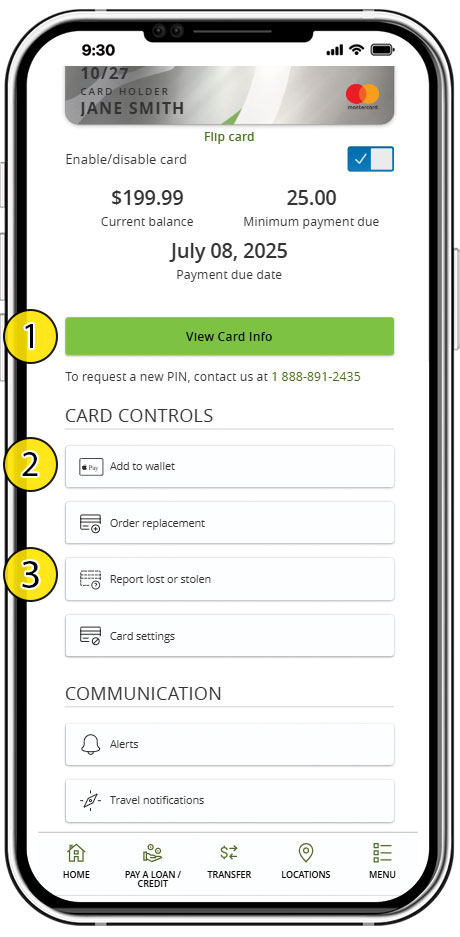
Digital card features
Credit and Debit cards are digital which gives you additional options for card use:

  1. “View Card Info” allows you to see credit or debit card information securely.
  2. "Add to wallet" lets you qickly add your digital credit or debit card to an Apple Pay or Google Wallet.
  3. Replace a lost/stolen card quickly. It's stressful when a card is lost or stolen. Upon approval you can get an instant-use replacement before your physical card's arrival in the mail.

Enable or disable your credit and/or debit card anytime
Whether you’re traveling or suspect your card may be lost or stolen, you can turn your card on or off with ease in the GreenState app or Online Banking.

Set card conditions
With Card Controls, you decide how, when, and where your card can be used. Manage spending, transaction, or merchant limits and enable alerts based on your choices.

Get real-time alerts
You can authorize alerts for transactions you would like to monitor, including:

  • Declined transactions
  • Purchases made abroad, in-store, or online
  • Transactions that exceed a set threshold
Card Activity Alerts

Create customized alerts through Card Controls so you know immediately when a transaction posts to your account. It's the easiest way to track all activity associated with your GreenState Credit Union cards. Choose to receive your alerts through text, email, or both. 

  • Get notified of declined transactions
  • Create alerts for purchases made abroad, in-store, or online
  • Set a dollar-amount threshold to monitor any transactions that exceed it 

If you're notified about a transaction you didn't make, you can quickly disable your card and contact us to report the suspicious activity.

Travel Notifications

When you travel out of state or internationally, you can quickly update us on your plans through the Travel Notifications option in Card Controls. We may block transactions from certain states or countries with high cases of card fraud to protect your accounts. By notifying us, we'll make sure your transactions process normally during your visit. (Even if you don't use Card Controls, you can share travel plans with us through our online chat or by visiting one of our branch locations.) Step-by-step instructions can be found in our Help Center.

Report your card lost or stolen

This feature helps you prevent fraudulent activity on your account when your card is compromised.

Get Started

Already using Digital Banking?

  1. Sign in to Digital Banking
  2. Go to Card Controls in the left hand navigation
  3. Enroll the cards you wish to use with Card Controls
  4. Select the “Alerts” button to set up the types of alerts you want to receive for each card

Additional details can be found in our Help Center

New to Digital Banking? To enroll, you’ll need:
  • Member number
  • Primary member information (last name, date of birth, SSN)
Learn to do more with your money
Financial Education
Learn smart money management.
Financial Calculators
Calculate payments, savings and more.
GreenState Blog
Get financial tips and advice.
Security & Fraud
Keep your personal information secure.
Earn Rewards
Get cash back on your everyday purchases

Gas and grocery purchases just got better with extra points.