
To help prevent fraud, when you log in to online banking or the mobile app from a new device you will also need to enter a secure access code that will be sent to you via a phone call or text message. Once that code is entered you can choose to register your device so that future logins don't require this second verification step. For security purposes please do not register public computers.
In order to choose the text message option, or to change the phone number where you receive secure access codes, you may need to update your Secure Access Delivery contact information. You can update your Secure Access Delivery contact information via online banking or the mobile app. If you're not able to login, please call our Member Assistance Center (319) 339-1000 and we can help you update your contact details.
Updating Secure Access Delivery details via Online Banking and GreenState Mobile
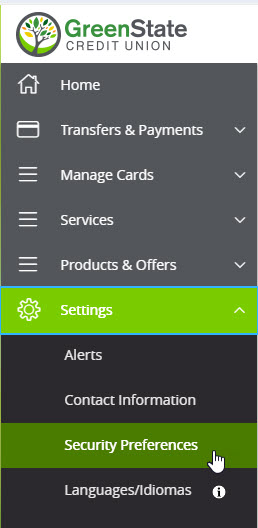
- From the main menu of your Online Banking, click or tap on Settings.
- In the Settings sub-menu, click or tap on Security Preferences.
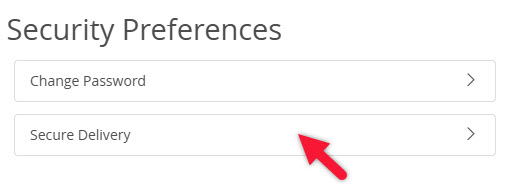
- Click or tap on the Secure Delivery option.
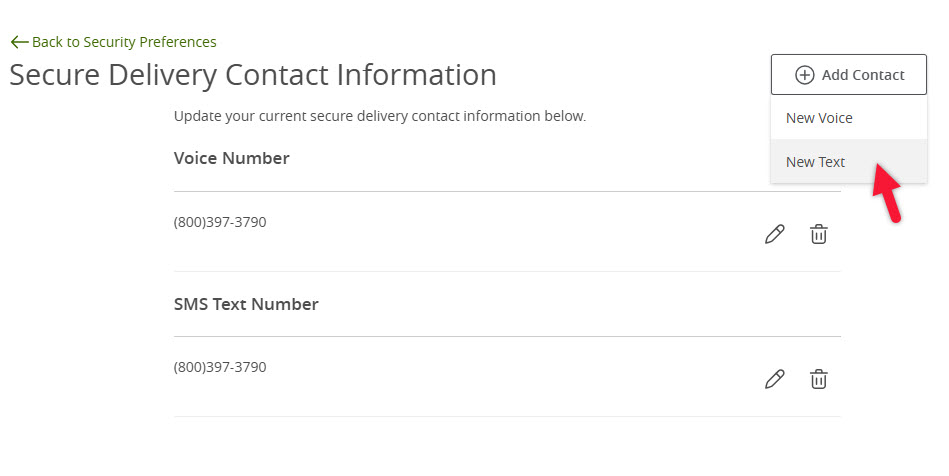
- Update the SMS Text Number show by clicking on the pencil icon (edit). If no number is listed you can add a new text number by clicking "+ Add Contact" > "New Text".
- Enter the phone number that you want secure access codes sent to.
- Click on the save button to save your update.
- You should now see a number under the heading SMS Text Number. You can return to this page and update or add new numbers as needed.
- Loans FAQ
- Mortgage Release Request
- Account and Routing Numbers
- GreenState Holiday Hours
- What is the $5 Membership?
- Mailing Addresses
- Financial Tools
- Why is online banking not staying registered?
- Viewing eStatements
- Updating your Contact Information
- Traveling
- Security Alerts
- Savings Bonds
- Safe Deposit Boxes
- Redeeming Your GreenState Credit Card Points
- Proof of Insurance
- Principal Only Payments
- Online Banking Balance & Activity Alerts
- Notary Services
- Nicknaming accounts
- NCUA Insurance
- Mortgage Loan Tracking in eStatus Connect
- Mobile Banking Touch/Face ID
- Making Payments
- Loan Payoff
- Loan Coupons
- Internal Transfers in Online Banking
- How to avoid skimmers
- Credit Card Statement Cycle Dates
- Compromised Cards
- Changing your Legal Name
- Cancel/Edit an Online Transfer
- Fraud Protection
- Card Controls
- Blocking Your Card
- IRA Transfers and Rollovers
- Penny Discontinuation FAQ
- Lost or Stolen Card
- Activating your new card
- Card Arrival
- Replacement Card
- Change your PIN number
- Deposit Holds
- Navegación de la traducción del sitio web
- Spending Limits
- Tax Documents
- Stopping Payments
- Closing your account
- Third Party Applications
- Check Order
- Bill Pay
- International Transfer
- Mobile Pay
- Secure Email
- How to sign a document with DocuSign
- How do I change my language in Online & Mobile Banking?
- Wire Transfers
- Photo Check Deposit
- Getting Money Into GreenState
- Deposit funds by Mail
- Updating Secure Access Code Delivery
- Card Dispute
- Enroll in Online Banking
- New Account Guide
- External Transfer in Online Banking
- Using the Online Payment Center