
Mortgage Loan Tracking
What is Servicing Digital?
Servicing Digital is your online portal to see balances, how payments were applied, certain tax documents, and your year end statement for your 1st Mortgage with GreenState.
How to Access Servicing Digital in Online Banking
- Login to online banking.
- Once signed into online banking click on the tile that shows your mortgage loan.
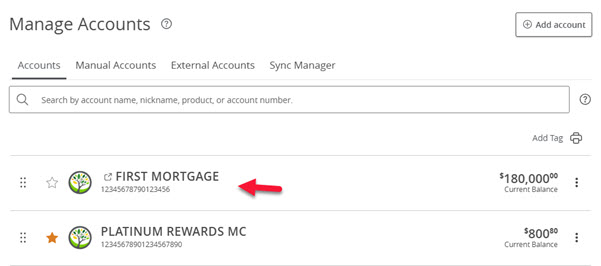
If you do not see your mortgage loan in online banking please chat with us online or call 800-397-3790.
Pages within
Help Center
- Loans FAQ
- GreenState Holiday Hours
- Mortgage Release Request
- Account and Routing Numbers
- What is the $5 Membership?
- Mailing Addresses
- Financial Tools
- Enrolling in Credit Card eStatements
- Why is online banking not staying registered?
- Viewing eStatements
- Updating your Contact Information
- Traveling
- Security Alerts
- Savings Bonds
- Safe Deposit Boxes
- Redeeming Your GreenState Credit Card Points
- Proof of Insurance
- Principal Only Payments
- Online Banking Balance & Activity Alerts
- Notary Services
- Nicknaming accounts
- NCUA Insurance
- Mortgage Loan Tracking in Servicing Digital
- Mobile Banking Touch/Face ID
- Making Payments
- Loan Payoff
- Loan Coupons
- Internal Transfers in Online Banking
- How to avoid skimmers
- Credit Card Statement Cycle Dates
- Compromised Cards
- Changing your Legal Name
- IRA Transfers and Rollovers
- Cancel/Edit an Online Transfer
- Fraud Protection
- Card Controls
- Blocking Your Card
- Penny Discontinuation FAQ
- Lost or Stolen Card
- Activating your new card
- Card Arrival
- Replacement Card
- Change your PIN number
- Deposit Holds
- Navegación de la traducción del sitio web
- Spending Limits
- Tax Documents
- Stopping Payments
- Closing your account
- Third Party Applications
- Check Order
- Bill Pay
- International Transfer
- Mobile Pay
- Card Dispute
- Secure Email
- How to sign a document with DocuSign
- How do I change my language in Online & Mobile Banking?
- Wire Transfers
- Photo Check Deposit
- Getting Money Into GreenState
- Deposit funds by Mail
- Updating Secure Access Code Delivery
- New Account Guide
- Enroll in Online Banking
- External Transfer in Online Banking
- Using the Online Payment Center