
As a GreenState member you are able to apply Principal Only Payments to select loan types.
How to apply a Principal Only Payment
- You can contact our member service support or stop into a branch to have our staff assist you in applying a Principal Only Payment.
- To apply a Principal Only Payment online:
- Log into your GreenState online banking or mobile app.
- Navigate to the Transfer/Deposit option in the left hand side menu. There select the To a Loan / Credit Card option.
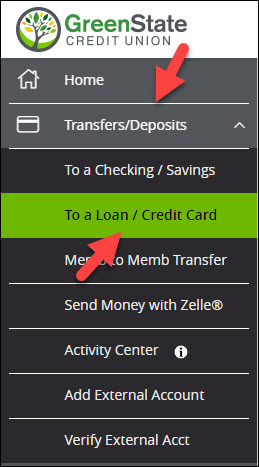
- On the Loan Payments page, you can adjust the Payment Type to Principal Only Payment.
- Not all loan types will offer this option. For more information please contact out member service team.
- You will not see the option for Principal Only Payments if you are paying from an external account.
Principal Only Payments and Due Dates
Processing a principal only payment will not advance your due date. While making a principal payment is a great way to reduce the overall balance on your loan, it will not impact the next payment due date. Please keep this in mind when planning your loan payments.
Eligible Loan Types for Principal Payments
Please note that principal payments can only be made on certain loan types through our Online Banking platform. While we strive to offer this feature for a wide range of loans, it may not be available for all loan products. If you have any questions about whether your loan qualifies for principal payments, our friendly member service team is here to assist you.
Restrictions on External Transfers
Unfortunately, principal payments cannot be made using Online Banking's External Transfers feature. If you wish to make a principal payment with an external account, you will first need to transfer the funds into a GreenState checking or savings share, then transfer the funds from that share to the loan.
Cases Where Principal Payments Are Not Accepted
Please be aware that we are unable to process principal payments in the following situations:
- Bankruptcy on account or loan
- Charged off accounts
- Past due accounts
- CPI (Collateral Protection Insurance) on the loan
- Principal payment equal to or greater than the loan balance
Important Reminder: Bringing a Loan to Zero (Loan Payoff)
It is crucial to understand that principal payments should NOT be made to bring a loan balance to zero. While it may seem logical, paying off the entire loan amount through principal payments alone is not recommended. If you wish to settle your loan in full see Loan Payoff.
If you have any further questions or need assistance with your loan, please don't hesitate to reach out to our dedicated member service team. We are always here to provide the guidance and support you need.