
Nicknaming accounts
In online banking you are able to nickname your accounts in order to better organize them.
How to nickname an account
- Login to online banking.
- In the left menu, select Manage Accounts inside of the Settings submenu.

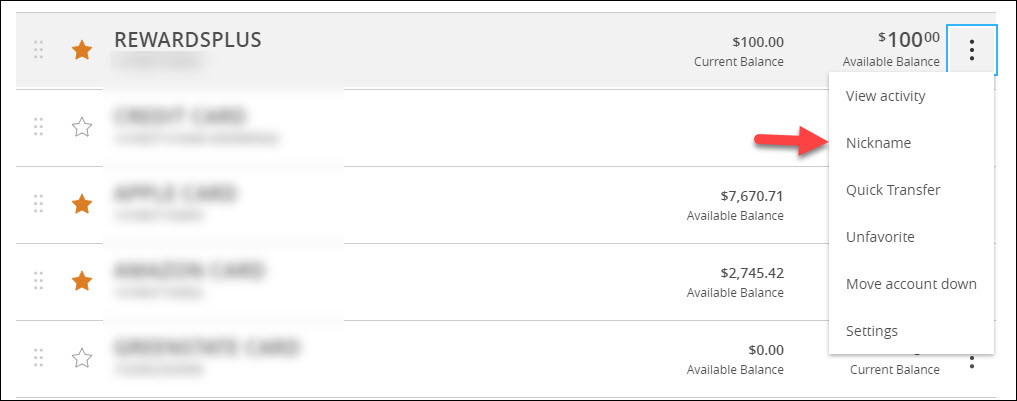
- Click on the three dots of the account you wish to nickname and select the Nickname option.
- Enter the nickname you wish to use in the Account Nickname field and click the Save button.
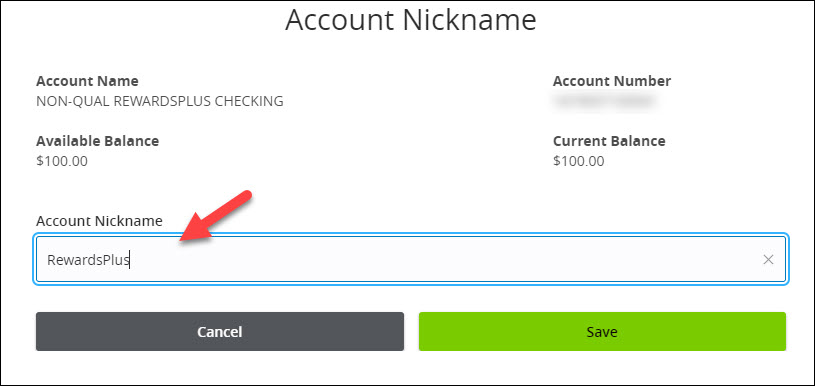
- The account will now show as the Nickname you entered.
Pages within
Help Center
- Loans FAQ
- Mortgage Release Request
- Account and Routing Numbers
- GreenState Holiday Hours
- What is the $5 Membership?
- Mailing Addresses
- Financial Tools
- Why is online banking not staying registered?
- Viewing eStatements
- Updating your Contact Information
- Traveling
- Security Alerts
- Savings Bonds
- Safe Deposit Boxes
- Redeeming Your GreenState Credit Card Points
- Proof of Insurance
- Principal Only Payments
- Online Banking Balance & Activity Alerts
- Notary Services
- Nicknaming accounts
- NCUA Insurance
- Mortgage Loan Tracking in eStatus Connect
- Mobile Banking Touch/Face ID
- Making Payments
- Loan Payoff
- Loan Coupons
- Internal Transfers in Online Banking
- How to avoid skimmers
- Credit Card Statement Cycle Dates
- Compromised Cards
- Changing your Legal Name
- Cancel/Edit an Online Transfer
- Fraud Protection
- Card Controls
- Blocking Your Card
- IRA Transfers and Rollovers
- Penny Discontinuation FAQ
- Lost or Stolen Card
- Activating your new card
- Card Arrival
- Replacement Card
- Change your PIN number
- Deposit Holds
- Navegación de la traducción del sitio web
- Spending Limits
- Tax Documents
- Stopping Payments
- Closing your account
- Third Party Applications
- Check Order
- Bill Pay
- International Transfer
- Mobile Pay
- Secure Email
- How to sign a document with DocuSign
- How do I change my language in Online & Mobile Banking?
- Wire Transfers
- Photo Check Deposit
- Getting Money Into GreenState
- Deposit funds by Mail
- Updating Secure Access Code Delivery
- Card Dispute
- Enroll in Online Banking
- New Account Guide
- External Transfer in Online Banking
- Using the Online Payment Center