
ATM/Gas Pump skimmers are a method used by criminals to capture data from the magnetic stripe on the back of a debit/credit card. Devices used are smaller than a deck of cards and are often fastened in close proximity to, or over the top of the ATM/Gas Pump's factory-installed card reader. ATM & Gas Pump skimming is a world-wide problem.
What is an ATM Skimmer?
It’s a device made to be affixed to an ATM and secretly swipe credit and debit card information when bank customers slip their cards into the machines to pull out money.
How can they be detected?
Some of the older devices were affixed to the outside of the machine (like the picture below). Newer devices are inserted into the ATM and are nearly impossible for the user to detect.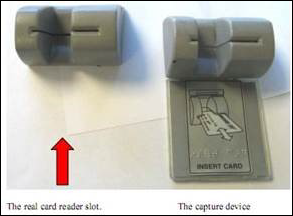
Is there a way to avoid skimmers?
Skimmers are extremely hard to detect. To date, we have not heard of any skimmer ever being placed on a merchant checkout terminal. So one possible solution is to get cash back when purchasing things at stores that allow for that type of service (Costco, HyVee, etc).
Tips to avoiding skimmers
- Pay attention to any machine (ATM, gas pump, etc) that you are putting your card into. If it looks odd, if any security tape that is used on that machine is stretched/torn/cut, etc then don’t use it and bring the situation to the attention of someone at that location.
- Using a gas pump in direct line of sight of the cashier tends to be “safer” than using one that is a bit hidden. Using an ATM inside a building tends to be safer than using a drive up machine as it is generally less private.
- Wiggle (carefully) the various components of the ATM, such as the card slot. They’re pretty solid and generally shouldn’t wiggle.
- Cover your hand as you input the PIN in case the scammer is using a camera to gather the PIN rather than a touchpad.
- Monitor your account and report any fraudulent transactions as soon as possible. The faster we know about a potential problem, the faster we can take action to protect all members from the inconvenience involved.