
Mobile Remote Deposit Capture allows members to take a photo of a check and deposit it in their GreenState account remotely, thus saving a trip to the branch or the postage to mail it. Make deposits to your account from anywhere just by using a scanning device, tablet, iPhone®, or Android®. Mobile Remote Deposit Capture is a free service and uses the highest level of security available so you can utilize it worry-free!
All deposits are subject to a hold, for more information please contact our Member Service team.
How to deposit a check using your mobile device
- When logged into our mobile app, on the homepage select the Deposit Check option.
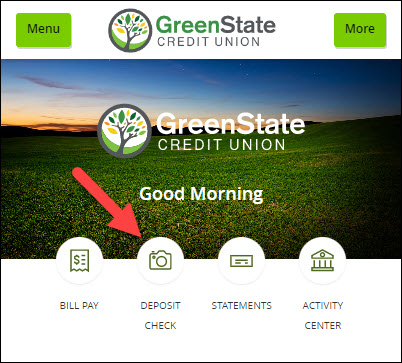
- This option can also be found in the upper left hand Menu under the Transfers/Deposits section.
- Be sure to endorse your check and write “FOR MOBILE DEPOSIT AT GREENSTATE CU" under your signature.
- Select the DEPOSIT ACCOUNT you would like to deposit the funds to.
- Enter the AMOUNT OF THE DEPOSIT and click SAVE.
- Click CAPTURE IMAGE to take a photograph of the front and back of the check.
- Click SUBMIT to finish making the deposit.
- When logged into our mobile app, on the homepage select the Deposit Check option.
Note: You can only do this with one check at a time. If you have more than one check, repeat the steps above.
How much can I deposit with Photo Check Deposit?
- $10,000 per deposit
- 5 deposits per day
- 20 deposits per month
- $10,000 total per day
- $20,000 total per month
If you'd like to request an increase please give us a call at 319-339-1000 or 800-397-3790
FAQs
Q: Why was my check declined?
A: There could be a few reasons your check was declined. The check is missing information such as the Routing Number, Account number or the endorsement FOR MOBILE DEPOSIT AT GREENSTATE CU. The check is damaged or is illegible. The amount exceeds $10,000.00 or more than 5 checks per day. The amount exceeds $20,000 or more than 20 checks per month.
Q: What do I do with my check after I make the deposit?
A: After you see the deposit has been accepted in the mobile app, write "void" on the check. Keep the deposited check for at least two business days or until you have confirmed the funds have been posted to your account, then you may shred the check.
Q: Do I need to apply for this service?
A: Members that are signed up for online banking need only to download the GreenState online banking app to receive the service.
Q: How secure is Mobile Remote Deposit Capture?
A: MRDC features multiple layers of security including password protection, Internet firewalls, and 128-bit encryption (256-bit encryption for mobile), the highest level of security available.
Q: What are the benefits of using MRDC?
A: You don’t need to visit one of our branch offices or go to an ATM to make check deposits. You can deposit from anywhere, 24/7.
Q: What are the fees for the service?
A: There are no fees to use this service.
Q: What types of accounts can I scan deposits into?
A: Any of our personal checking or savings accounts.
Q: Can I view a statement or history of deposits?
A: Yes.
Q: Can I print out a copy of a Remote Deposit check?
A. Yes, you can print them from your History screen in MRDC up to 30 days from the date of the transaction. Thereafter, you will need to request a copy just like any other deposited item.
Q: Can I still bring check deposits into a branch office?
A. Yes. After you are registered for MRDC, you can still make deposits in whatever method is most convenient for you.